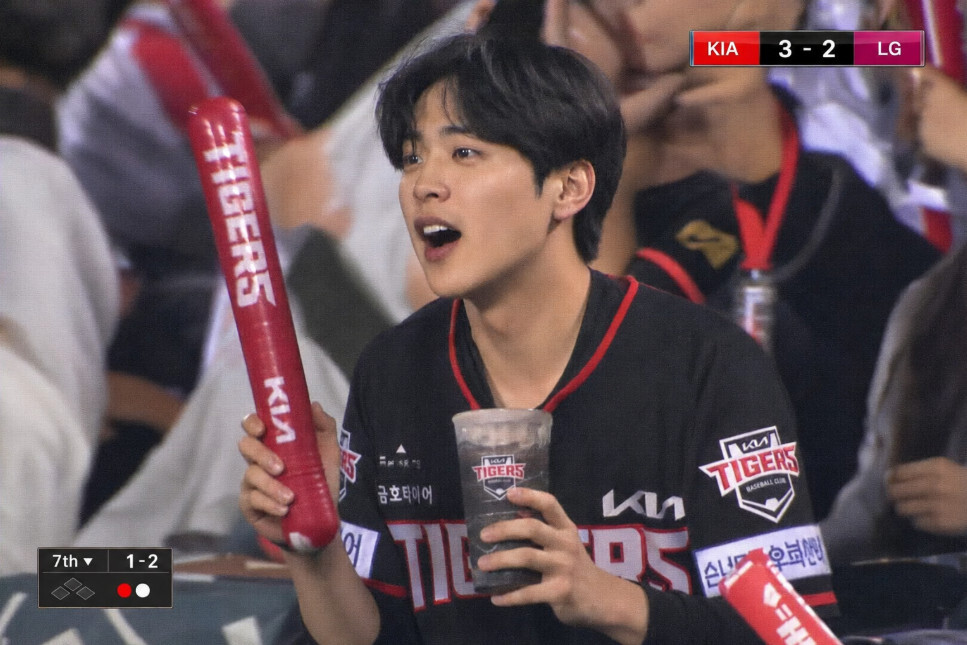
내 사진 한 장이 야구장 중계 화면으로? 챗지피티 야구장 프롬프트로 진짜 방송 캡처처럼 야구장 ai 만드는 법 공개합니다. KIA·LG·두산 유니폼 교체까지 가능, 복붙만 하면 바로 됩니다.
① TV 중계 화면 캡처 스타일 (KIA 타이거즈 기준)
Treat the uploaded photo as the most critical reference for facial reconstruction.
Maintain the exact facial structure, eye shape, nose bridge, lip shape, jawline, skin tone,
and hairstyle of the person in the uploaded image without any alterations.

Generate a photorealistic image styled as a Korean KBO baseball broadcast screen capture.

The subject is wearing a KIA Tigers official home uniform (red and black color scheme,
KIA Tigers logo on the chest). The person is seated in the stadium stands,
slightly leaning forward with excitement, eyes focused toward the field,
completely unaware of the camera — a candid natural moment.

Camera style: telephoto broadcast zoom lens, shallow depth of field,
the background crowd and stadium lights are softly blurred (bokeh effect).
The overall lighting is warm evening stadium floodlight,
with a hint of the LED scoreboard light reflecting on the subject's face.

Props around the subject: a red thunder stick (응원봉) in one hand,
a paper cup of beer or cola in the other hand.
Surrounding fans are wearing KIA Tigers gear, blurred in the background.

Overlay broadcast graphics on the image:
- Top right corner: score display box showing "KIA 3 - 2 LG" with team colors
- Bottom left corner: small inning and ball-strike count indicator "7th | 1-2"
- Subtle broadcast compression noise and slight video grain across the entire image
  to simulate a real TV broadcast screenshot

The final image must look exactly like a screenshot captured from a live KBO TV broadcast,
indistinguishable from a real photograph taken during an actual game.
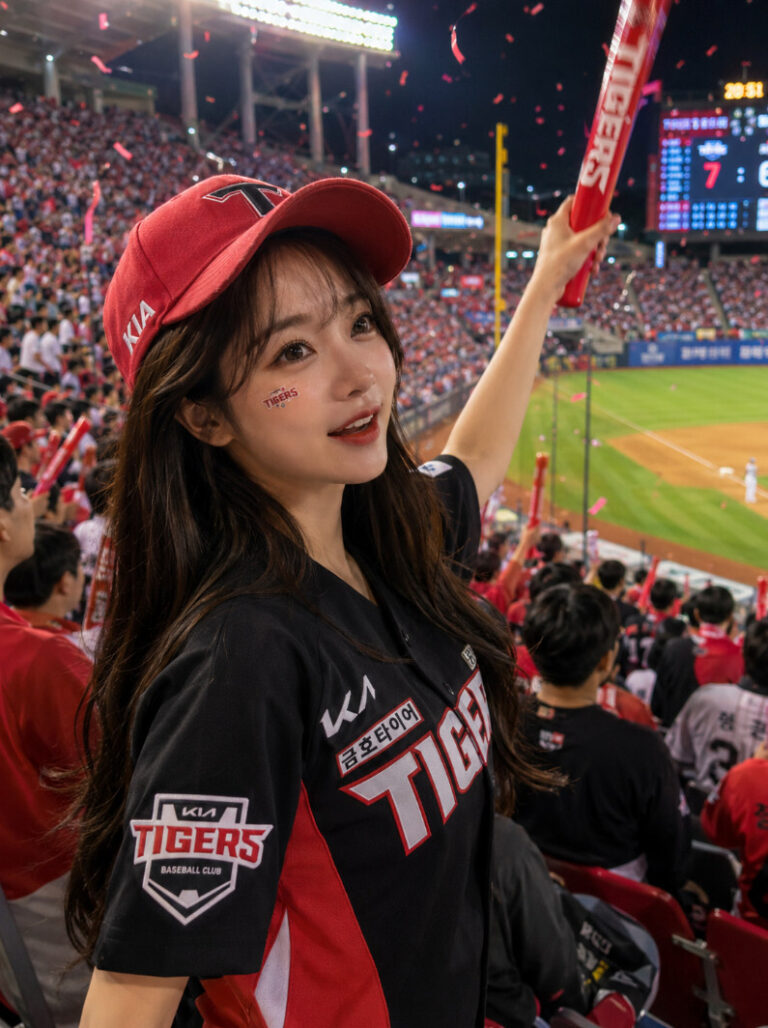
② 관중석 자연스러운 직캠 스타일 (KIA 타이거즈 기준)
Treat the uploaded photo as the most critical reference for facial reconstruction.
Preserve the exact facial features, eye shape, nose, lips, skin tone,
and hairstyle from the uploaded image with maximum fidelity.

Generate a photorealistic candid-style photo taken from a fan at a KBO baseball stadium.

The subject is wearing a KIA Tigers official uniform (red and black, KIA logo).
The person is standing and cheering, mouth slightly open,
eyes looking toward the field with a big smile — a genuine, joyful moment.

Camera style: shot with a smartphone camera from a slightly low angle,
natural handheld feel with very subtle motion blur.
Warm evening floodlight from the stadium overhead lights.
The background shows rows of stadium seats filled with fans in red KIA Tigers gear,
all softly blurred.

Props: thunder stick (빨간 응원봉) raised in the air,
KIA Tigers cap on the subject's head.
Stadium atmosphere: packed crowd, confetti or streamers in the air,
large LED scoreboard visible in the far background showing a close score.

The photo should feel like it was taken by a friend sitting next to the subject —
spontaneous, energetic, and completely natural.
High resolution, cinematic color grading with slightly saturated warm tones.
사용 팁 상세 안내
1)사진 업로드할 때 이것만 지키세요
챗지피티에 접속하면 채팅창 왼쪽 하단에 클립 모양 아이콘이 있어요. 그걸 눌러서 사진을 먼저 올린 뒤, 프롬프트를 입력하는 순서로 진행하시면 됩니다. 사진을 올릴 때는 아래 기준을 지킬수록 결과물 퀄리티가 확실히 올라가요.
- 정면 사진 → 옆모습이나 45도 각도 사진보다 정면이 얼굴 재현도가 훨씬 높아요
- 얼굴이 크게 나온 사진 → 전신 사진보다 얼굴이 화면의 절반 이상 차지하는 사진이 좋아요
- 자연광 or 실내 밝은 조명 → 어둡거나 역광 사진은 피하세요
- 선글라스·마스크 없는 사진 → 얼굴 특징을 가리는 요소가 없을수록 좋아요
- 배경이 단순한 사진 → 복잡한 배경보다 흰 벽이나 단색 배경이 얼굴 인식에 유리해요
2)프롬프트 붙여넣기 & 첫 결과물 확인
사진 업로드 후 위에 드린 프롬프트를 그대로 복사해서 채팅창에 붙여넣고 전송하면 됩니다. 생성까지는 보통 1~2분 정도 걸려요. 첫 결과물을 받으면 아래 순서로 체크해보세요.
- 얼굴이 본인과 닮았는지
- 유니폼 색상과 팀 로고가 제대로 나왔는지
- 중계 그래픽(스코어, 이닝 표시)이 화면에 들어갔는지
- 전체적인 분위기가 경기장처럼 보이는지
3)결과가 마음에 안 들 때 추가 요청하는 법
한 번에 완벽한 결과물이 나오지 않는 경우가 많아요. 아래처럼 부분별로 수정 요청을 하면 원하는 방향으로 다듬을 수 있어요.
얼굴이 안 닮았을 때
“업로드한 사진의 얼굴과 더 비슷하게 다시 만들어줘. 눈 모양, 코, 입술 형태를 원본 사진 기준으로 최대한 유지해줘.”
유니폼이 이상하게 나왔을 때
“KIA Tigers 공식 홈 유니폼으로 다시 만들어줘. 빨간색과 검정색 배색, 가슴에 KIA 로고가 있는 유니폼이야.”
중계 그래픽이 안 들어갔을 때
“화면 우측 상단에 KIA 3 – 2 LG 스코어 박스를 추가하고, 좌측 하단에 이닝과 볼카운트 표시도 넣어줘.”
배경이 경기장처럼 안 보일 때
“배경을 KBO 야구 경기장 관중석으로 바꿔줘. 관중은 흐릿하게 아웃포커싱 처리하고, 저녁 경기 분위기의 조명으로 바꿔줘.”
전체적으로 TV 방송 느낌이 부족할 때
“영상 압축 노이즈와 약간의 화질 저하를 추가해서 실제 TV 중계 캡처 화면처럼 보이게 만들어줘.”
4)퀄리티를 한 단계 더 올리고 싶을 때
기본 결과물에서 더 완성도를 높이고 싶다면 아래 방법을 시도해보세요.
- 같은 프롬프트로 2~3번 재생성 → 같은 조건이어도 매번 결과물이 달라서 그중 가장 마음에 드는 걸 고르는 방식이 효율적이에요
- 한국어 수정 요청이 잘 안 먹힐 때는 영어로 → “Make the face more similar to the uploaded photo. Keep the eye shape, nose bridge, and lip shape exactly as in the reference image.” 이런 식으로 영어로 요청하면 반응이 더 정확해요
- 프롬프트 앞에 이 문장 추가 → “The uploaded photo is the most critical reference. Do not change the facial features under any circumstances.” 라고 맨 앞에 한 줄 더 추가하면 얼굴 유사도가 눈에 띄게 올라가요
- 팀 바꿀 때는 이 부분만 교체 → 프롬프트에서 KIA Tigers만 아래처럼 바꾸면 바로 적용돼요
| 팀 | 교체할 텍스트 |
|---|---|
| LG 트윈스 | LG Twins (white and red uniform) |
| 두산 베어스 | Doosan Bears (navy and red uniform) |
| 한화 이글스 | Hanwha Eagles (orange and black uniform) |
| 삼성 라이온즈 | Samsung Lions (blue and white uniform) |
| SSG 랜더스 | SSG Landers (red and yellow uniform) |